Find yourself writing the same descriptions over and over again? Tired of typos coming up in your reports? Faraday provides a simple solution: unify criteria for naming vulnerabilities and save time and effort to yourself and your team.
Write vulns once and use them forever!
Faraday Server comes with its own CWE Vulnerabilities DB for you to use. This is a simple CSV made using Open Source projects based in the CWE standard and allows you to create vulnerabilities without worrying about finding references, description, etc.
Faraday ships with a CSV of the original Mitre project included in its tree in data. However, we also ship two different scripts to generate CSVs for CFDB and VulnDB. These scripts will download and parse the contents of those databases.
- CFDB Execute the following command to get a CSV for CFDB
/home/faraday/.faraday/scripts/cfdbToCsv.py
- VulnDb Execute the following command to get a CSV for VulnDB
/home/faraday/.faraday/scripts/vulndbToCsv.py
Next copy this CSV file (either cfdb.csv or vulndb.csv) to /data/cwe.csv.
Go to the Vulnerability Templates tab in the Web UI and click on the import icon

A modal dialog will pop up asking you to choose a CSV file to upload, select it, click ok and you're done!
You can also create templates manually in the Web UI. Click on the vulnerability templates icon

You will get a list of the existing templates in your installation

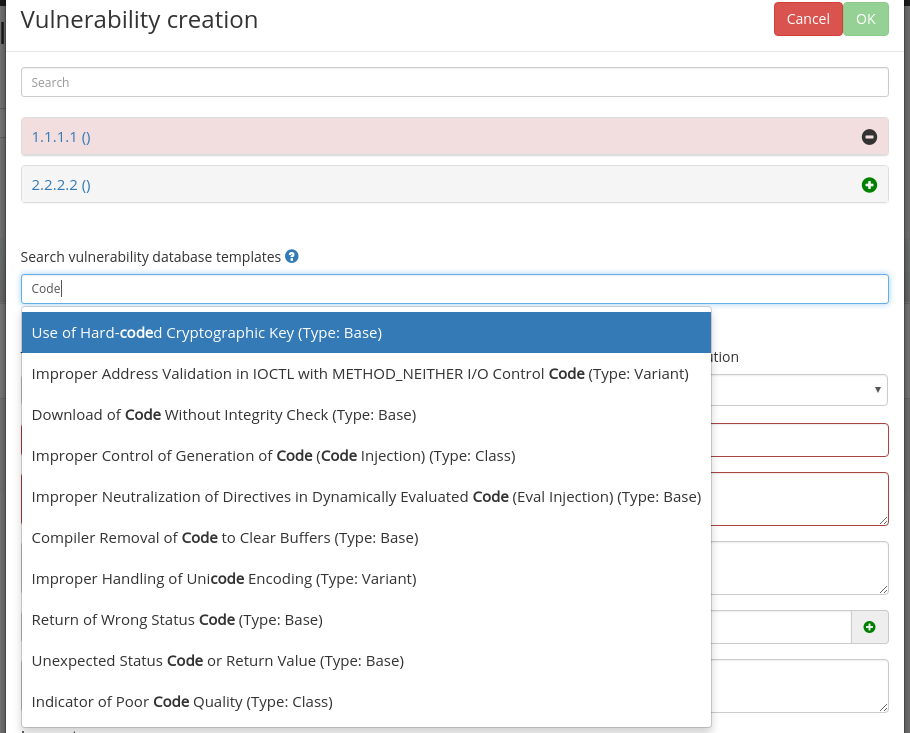
Login to your Faraday Web UI and create or edit a vulnerability. A search field will allow you to find your templates, as shown in the picture below.
You can also duplicate vulnerabilities easily by saving them as a template.

and later on importing the template:

Note: Name, Description and Resolution fields are replaced with the information stored in the templates database.